Hard Drive Explained in Simple Words
Published: 29 Jan 2026
Did you know that the first hard drive was introduced in 1956 and could store only 5 MB of data? Today, hard drives can store terabytes of information, holding all your photos, videos, and important files. A hard drive is one of the most important parts of a computer because it keeps your data safe and ready whenever you need it.
What is hard drive?
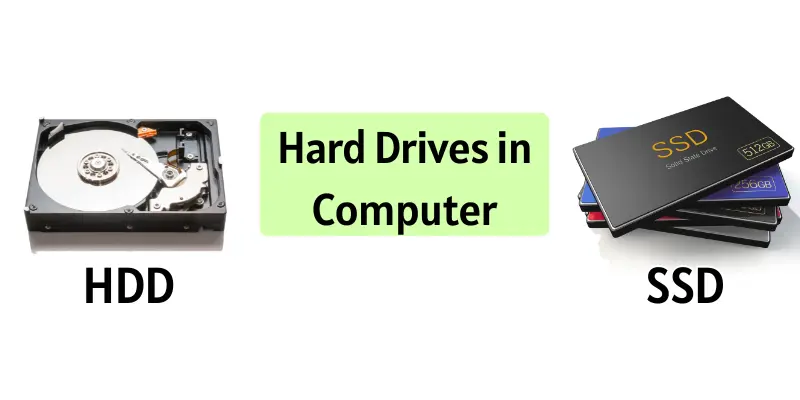
A hard drive is a device inside a computer that stores all your data. It keeps your files, photos, videos, and programs safe and secure. It comes in two main types: HDD and SSD. They allow your computer to save and retrieve information whenever you need it. Without a hard drive, your computer cannot remember anything after it is turned off.
Types of Hard Drives
Hard drives come in different types to store data in a computer. Each type has its own speed, storage capacity, and cost.
Types of Hard Drives:
- HDD (Hard Disk Drive): Uses spinning disks to store data and is cheaper.
- SSD (Solid State Drive): Uses memory chips, is very fast, and more reliable.
- Hybrid Drive (SSHD): Combines HDD and SSD for more space and speed
How Does a Hard Drive Work
A hard drive works like a digital storage box for your computer. It keeps all your data safe and secure.
- HDD (Hard Disk Drive): Inside, there are spinning disks called platters. A small arm, called the read/write head, moves over the disks to read or write data. The faster the disks spin, the quicker your computer can find and use your files.
- SSD (Solid State Drive): SSD has no moving parts. It uses memory chips to store data. This makes it very fast because it can access files instantly.
Hard Drive Components
A hard drive has different parts that help it store and access data:
- Platter (HDD only): Spinning disks where all data is stored.
- Read/Write Head (HDD only): A tiny arm that moves over the platters to read or write data.
- Spindle (HDD only): The part that spins the platters at high speed.
- NAND Flash (SSD only): Memory chips that store data electronically.
- Controller: The brain of the hard drive that tells it how to read and write data.
- Casing: The outer shell that protects all parts of the hard drive.
In simple words, a hard drive works like a library. Your files are books, and the hard drive helps you find and open them whenever you need.
Hard Drive Capacity and Speed
A hard drive has two main features: capacity and speed:
- HDD Capacity: Usually 500 GB, 1 TB, 2 TB, or up to 16 TB. Good for storing lots of files, movies, and programs.
- SSD Capacity: Usually 120 GB, 250 GB, 500 GB, 1 TB, or 2 TB. Faster, but smaller and more expensive than HDD
- HDD Speed: Usually 5,400 RPM or 7,200 RPM. Some high-end HDDs can reach 10,000 RPM. Higher RPM means faster access to data.
- SSD Speed: Usually 400–550 MB/s for SATA SSDs and up to 3,500 MB/s for NVMe SSDs. Much faster than HDDs.
In short, HDD gives more storage for less money, and SSD gives faster performance.
Advantages and Disadvantages of Hard Drives
Hard drives are very important for storing data in a computer. They have both good points and some limitations.
| Advantages |
|---|
|
| Disadvantages |
|---|
|
Fun Facts About Hard Drives
Hard drives are interesting and have some fun facts you may not know:
- The first hard drive, made in 1956, could store only 5 MB of data.
- Today, some hard drives can store up to 16 TB of data!
- SSDs have no moving parts, making them quieter and more durable than HDDs.
- Hard drives are used not only in computers but also in servers, gaming consoles, and cameras.
- Some data centers use thousands of hard drives to store millions of files for the internet.
Conclusion
So guys, it’s time to finish up! In this article, we’ve covered hard drive in detail. I personally recommend using an SSD if you want your computer to be fast and reliable. Remember to choose a hard drive that fits your storage needs. Start exploring your computer today and see how your hard drive keeps all your files safe!
FAQs about hard drive
HDD uses spinning disks to store data, while SSD uses memory chips. SSD is faster and more reliable, but usually costs more. HDD is cheaper and can store more data but is slower.
You can check your computer’s storage settings. If the space used is close to the total capacity, your hard drive is almost full. You may need to delete or move some files to free up space.
Yes, you can replace or add a new hard drive to your computer. Make sure it is compatible with your system. Upgrading can give you more storage or faster speed.
Avoid dropping or hitting your computer. Keep it away from extreme heat or moisture. Regularly back up your important files to prevent data loss.
A typical HDD lasts about 3–5 years, while SSDs can last 5–10 years. Lifespan depends on usage and care. Regular backups can protect your data if the hard drive fails.
Hard drives can fail due to physical damage, viruses, overheating, or old age. Mechanical parts in HDDs can wear out over time. SSDs can fail due to memory chip wear or power issues.
Sometimes, yes. Data recovery software or professional services can help. But it is not always guaranteed, so backing up important files is important.
You can delete unnecessary files and programs. Regularly defragment an HDD or use disk cleanup tools. Using an SSD instead of an HDD will make your computer much faster.

- Be Respectful
- Stay Relevant
- Stay Positive
- True Feedback
- Encourage Discussion
- Avoid Spamming
- No Fake News
- Don't Copy-Paste
- No Personal Attacks
- Be Respectful
- Stay Relevant
- Stay Positive
- True Feedback
- Encourage Discussion
- Avoid Spamming
- No Fake News
- Don't Copy-Paste
- No Personal Attacks
