Differences between Linux and Windows OS
Published: 8 Feb 2026
Computers need an operating system to work. It runs programs and manages files. It also connects your computer to the internet. Two popular systems are Linux OS and Windows OS. Both are different. Each has its own strengths and weaknesses.
Many people get confused about which one to use. Linux OS and Windows OS can do similar tasks. But they differ in speed, security, and ease of use. This guide will help you understand them in simple words. By the end, you will know the difference between Linux OS and Windows OS.
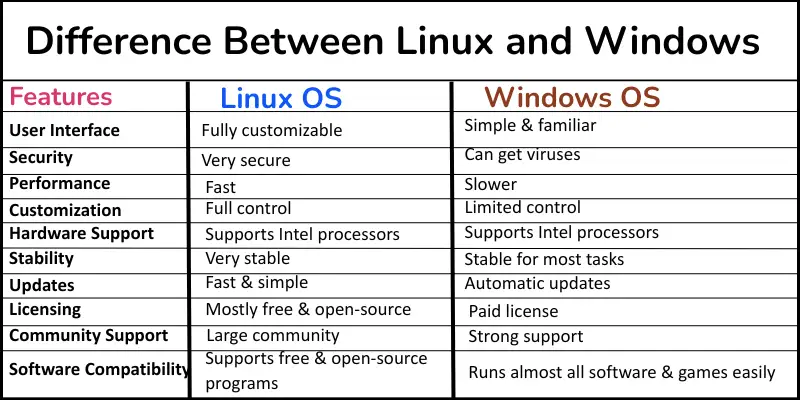
Let’s explore the key differences between Linux OS and Windows OS in detail.
What is the difference between Windows and Linux operating systems?
The Windows and Linux operating systems are software that run your computer. Windows is popular for personal use and gaming. Linux is mostly used for servers and programming. They work differently and have different features.
The main difference is how they manage programs, security, and customization. Windows is easy for beginners. Linux is flexible and powerful for advanced users. Knowing this helps you choose the right system for your needs.
10 differences between Linux and Windows OS
Linux OS and Windows OS are two popular operating systems. They work differently and have many key differences. Here are 10 key differences between Linux and Windows.
- User Interface
- Security
- Performance
- Customization
- Software Compatibility
- Hardware Support
- Stability
- Updates
- Licensing
- Community Support
1. User Interface
The user interface is how we see and use the computer. It shows menus, icons, and windows. A good interface makes the computer easy to use and understand.
Linux
Linux has many types of user interfaces. You can choose how your desktop looks. It can be simple or colorful. You can easily change icons, menus, and themes. Linux lets you control almost everything on your desktop.
Windows
Windows has a simple and familiar interface. Most people find it easy to use. Menus, icons, and the taskbar are clear. You can open programs and files quickly. Windows also lets you change themes, wallpapers, and start menu layout.
2. Security
Security keeps your computer and files safe from viruses, malware, and hackers. A secure system protects your personal data and helps your computer run smoothly.
Linux
Linux keeps your system very safe. It rarely gets viruses or malware. It asks for your permission before installing programs or making big changes. Linux has strong built-in security tools. Developers and programmers trust Linux for safe work.
Windows
Hackers often target Windows because many people use it. You can get viruses if you are not careful. You need antivirus software to protect your computer. Windows sends regular updates to fix security problems. It asks for your permission before big changes to keep your system safe.
3. Performance
Performance measures how fast and smoothly a computer works. A well-performing system runs programs quickly and does not slow down.
Linux
Linux works very fast. It uses less RAM, CPU, and storage than Windows. It starts quickly and runs programs smoothly. Many people use Linux on old computers because it can make them faster.
Windows
Windows works well for most tasks. It uses more RAM, CPU, and disk space than Linux. Sometimes it slows down if too many programs run at once. Windows updates and extras
4. Customization
Customization means changing the computer to fit your needs and style. A system with good customization lets you work the way you like.
Linux
Linux lets you change almost everything. You can adjust the desktop layout, icons, themes, and menus. You can choose different desktop environments like GNOME or KDE. Linux gives you full control over how your computer looks and works.
Windows
Windows allows some changes, too. You can change themes, wallpapers, the start menu, and the taskbar. It does not let you change everything as Linux does. Windows gives an easy and simple way to personalize your computer.
5. Software Compatibility
Software compatibility means which programs can run on your computer. A system with good compatibility lets you use many useful apps.
Linux
Linux can run many free and open-source programs. It supports software for programming, servers, and web development. Some popular Windows programs do not work directly on Linux. But you can use tools like Wine to run some Windows apps.
Windows
Windows runs almost all software. You can use office programs, games, and professional apps easily. Most software companies create programs for Windows first. It gives the easiest way to install and run apps.
6. Hardware Support
Hardware support means how well an operating system works with computer parts. Good support helps your computer run smoothly with all devices.
Linux
Linux works with many types of hardware. It supports Intel processors, NVIDIA graphics cards, and USB devices. Some new devices may need extra drivers. You can install drivers easily using package managers. Linux also works well on older computers.
Windows
Windows works with most hardware automatically. It supports Intel processors, NVIDIA graphics cards, and printers. New devices usually work without extra installation. Windows also supports gaming hardware, SSDs, and professional tools easily.
7. Stability
Stability is how reliable a computer system is. A stable system works smoothly without crashing. It helps you finish tasks without interruptions.
Linux
Linux is very stable. It rarely crashes, even during heavy work. Many servers, programmers, and businesses trust Linux for long-term work. It can run for months without restarting. Linux handles tasks like web hosting, programming, and data processing easily.
Windows
Windows is stable for most tasks. It can sometimes crash if too many programs run at the same time. Updates or extra software can affect stability. Windows works well for home use, office work, and gaming, but it may need occasional restarts.
8. Updates
Updates mean new improvements or fixes for your computer system. Regular updates keep your computer safe and fast.
Linux
Linux updates are fast and simple. Most updates do not need a restart. You can update programs and the system together. Linux updates also regularly improve security and performance.
Windows
Windows updates happen automatically. Some updates need a restart to finish. Updates fix security issues and add new features. Windows keeps your computer safe, but it may take more time to install updates.
9. Licensing
Licensing refers to the rules governing how you can use an operating system. It tells you if the system is free or paid and what you can legally do with it. Good licensing keeps your computer safe and your use legal.
Linux
Linux is mostly free and open-source. You can use, modify, and share it legally. Developers like Linux because it gives them freedom. Most Linux versions do not require payment. You can install it on many computers without extra cost.
Windows
Windows is a paid operating system. You must buy a license to use it legally. It limits some changes you can make. Windows gives official support, updates, and security features with its license. Most people use Windows for home, office, and gaming.
10. Community Support
Community support is help from people who use the same system. A strong community can solve problems and share tips.
Linux
Linux has a large community. You can get help from forums, online guides, and developer groups. People share solutions, tools, and tutorials for free. The community makes Linux easier for beginners and experts.
Windows
Windows also has strong support. You can get help from official support, Microsoft forums, and tech blogs. Many tutorials and guides are available online. Windows users can find help quickly for almost any problem.
Which is better, Linux or Windows?
Choosing the best operating system depends on your needs. Both Linux and Windows have strong points.
- Linux: Linux is great for programmers, developers, and servers. It is fast, secure, and flexible. You can customize almost everything. Linux works well on old computers.
- Windows: Windows is easy for beginners. It runs almost all software and games. You can use it for home, office, and gaming. Windows has clear menus and simple controls.
Linux is better if you want control, security, and speed. Windows is better if you want simplicity, compatibility, and lots of software. The best choice depends on how you use your computer.
Conclusion
So guys, it’s time to finish up! In this article, we’ve covered the difference between Linux OS and Windows OS in detail. From my experience, Linux is great for learning programming and customizing your computer. Windows works best for beginners and gamers. Pick the one that suits your work or hobby and start using it confidently!
FAQs about linux os vs windows
Here are some most common questions about Linux and windows difference
Linux is better for programming and development. It has many tools and supports languages like Python, Java, and C++. Windows also works but Linux gives more control for developers.
Yes, Linux can handle office work. You can use free programs like LibreOffice or OpenOffice. It works well for documents, spreadsheets, and presentations.
Windows is better for gaming. Most games are made for Windows. Linux can run some games, but not all.
Yes, you can install Linux alongside Windows using dual-boot. You can also use a virtual machine. Both ways let you try Linux safely.

- Be Respectful
- Stay Relevant
- Stay Positive
- True Feedback
- Encourage Discussion
- Avoid Spamming
- No Fake News
- Don't Copy-Paste
- No Personal Attacks
- Be Respectful
- Stay Relevant
- Stay Positive
- True Feedback
- Encourage Discussion
- Avoid Spamming
- No Fake News
- Don't Copy-Paste
- No Personal Attacks
