Types of software testing with examples
Published: 2 Mar 2026
Software testing is an important part of making good software. It helps developers find errors and problems before the software is used by people. Without testing, software may not work properly, and users may face many issues.
There are various types of software testing that help check different parts of a program. Some testing types check software features, while others check speed, security, and performance. Each type of testing has a special purpose.
In this article, you will learn about the different types of software testing with examples in a simple and easy way. This guide will help beginners understand how software testing works and why it is important
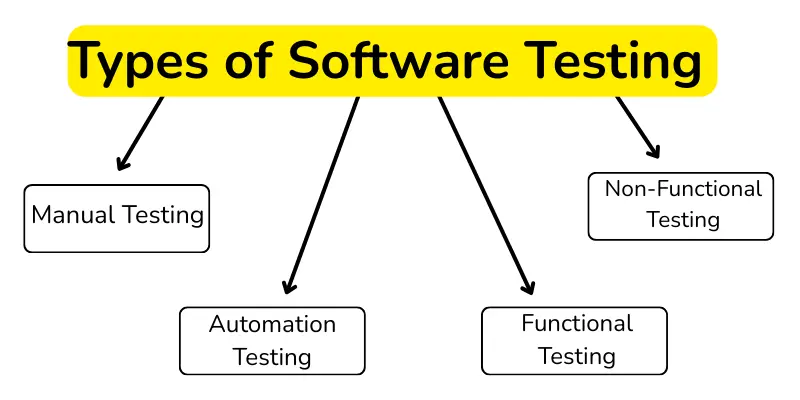
Main Types of Software Testing
Software testing is divided into categories to test software from all angles. Each type focuses on a specific purpose, such as functionality, performance, or security, to make sure the software works perfectly. Here are some software tests catagories
- Manual Testing
- Automation Testing
- Functional Testing
- Non-Functional Testing
1. Manual Testing
Manual testing is a simple way to check software. In this test, a tester uses the software on their own to see if it works correctly. No special tools or automation are used. The tester checks each feature step by step and finds any bugs or errors. Manual testing is easy and simple, especially for beginners and small projects.
1. Why is Manual Testing Important?
Manual testing is important because it helps improve software.
- Finds errors and bugs in the software
- Makes software safe and user-friendly
- Best for beginners and small projects
- Flexible and easy to use without tools
2. Process of Manual Testing
Manual testing is done in simple steps to check the software carefully.
1. Requirement Analysis
This step helps the tester understand what the software should do:
- Read project documents carefully
- Identify important features to test
- Know what to check in the software
2. Test Planning
This step helps organize testing and save time:
- Decide which features or parts need testing
- Create a plan for how testing will be done
- Assign tasks to testers if more than one person is testing
3. Test Case Preparation
This step helps testers follow proper instructions while testing:
- Write step-by-step instructions for testing each feature
- Include input to give and the expected output
- Clear test cases help find errors easily
4. Test Execution
This step is about using the software to check for errors:
- Follow the test cases and use the software manually
- Check if the software behaves correctly for each step
- Record any errors or bugs found
5. Defect Reporting
This step helps developers fix the problems quickly:
- Report all bugs and errors to the developer
- Include details about the problem and how to reproduce it
- Helps developers fix issues faster
3. Types of Manual Testing
Manual testing includes these types:
- Black Box Testing: Test the software without knowing the code
- White Box Testing: Test the software by understanding the internal code
- Unit Testing: Test small parts or modules of the software
- Integration Testing: Test multiple modules together
- System Testing: Test the complete software system
- Acceptance Testing: The client or user checks if the software works properly
- Exploratory Testing: The tester explores the software freely to find bugs
4. Examples of Manual Testing
Some examples of manual testing are:
- Login Page Testing: Check if username and password work correctly
- Form Validation Testing: Check if form fields are filled correctly and show errors
- Website Navigation Testing: Check if all links and buttons work properly
- E-commerce Testing: Check if products, cart, and checkout work correctly
5. When to Use Manual Testing
Manual testing is best used for:
- Small Projects: Easy and simple for small software projects
- Usability Testing: Check if the software is easy and user-friendly
- Exploratory Testing: The tester freely explores the software to find bugs
- New Features Testing: Test new features that are hard to automate
2. Automation Testing
Automation testing is a way to test software using special tools or scripts. It helps testers check software faster and with fewer mistakes than manual testing. Automation is best for big projects or repetitive tasks.
1. Importance of Automation Testing
Automation testing is important because it saves time and increases accuracy:
- Tests software faster than manual testing
- Reduces human errors
- Helps test large or complex software
- Good for repetitive tests
2. Process of Automation Testing
Automation testing follows these simple steps:
1. Test Planning
This step helps organize which parts of the software to automate:
- Decide which features need automation
- Choose the right automation tools
- Plan the test scripts and schedule
2. Test Script Development
This step is about writing scripts to run tests automatically:
- Write scripts using tools like Selenium, TestNG, or JUnit
- Make sure scripts cover all important scenarios
- Validate scripts before running full tests
3. Test Execution
This step runs the automated tests:
- Execute test scripts using automation tools
- Check the results for errors or failures
- Record test results for reporting
4. Defect Reporting
This step helps developers fix problems quickly:
- Report any errors found by automation
- Include details about the test and scenario
- Helps fix issues faster and improve software quality
Advantages of Automation Testing
| Advantages |
|---|
|
Disadvantages of Automation Testing
| Disadvantages |
|---|
|
3. Examples of Automation Testing
Here are some simple examples to show how automation testing works:
- Login Test Automation: Automatically check login functionality
- Form Filling Automation: Test multiple forms quickly
- E-commerce Cart Testing: Test add to cart, remove, and checkout automatically
- Regression Testing: Re-run tests after software updates
3. Functional Testing
Functional testing checks if software features work correctly. It focuses on what the software does, not how it works inside.
1. Importance of Functional Testing
Functional testing is important because it ensures software works as expected:
- Checks that all features work correctly
- Helps find bugs in specific functions
- Makes software reliable for users
2. Process of Functional Testing
Functional testing usually follows these steps:
1. Requirement Analysis
This step helps testers understand what to check:
- Read software requirements carefully
- Identify features to test
- Know expected behavior for each feature
2. Test Planning
This step organizes testing activities:
- Decide which features to test first
- Create a plan for testing
- Assign tasks to testers if more than one person is testing
3. Test Case Preparation
This step prepares instructions for testing:
- Write step-by-step instructions for each feature
- Include input to give and expected output
- Clear test cases help find errors easily
4. Test Execution
This step runs the tests:
- Follow test cases and check each feature manually or with tools
- Record any bugs or errors found
- Compare results with expected outcomes
5. Defect Reporting
This step reports problems to developers:
- Report all errors and bugs
- Include details about the test and scenario
- Helps developers fix issues faster
2. Types of Functional Testing
Functional testing types include:
- Unit Testing: Tests small parts or modules of software automatically
- Integration Testing: Tests multiple modules together automatically
- System Testing: Tests the complete software system automatically
- Regression Testing: Re-runs previous tests after software updates
- Performance Testing: Tests speed and stability under load
- Smoke Testing: Quick test to check if software is ready for detailed testing
- Acceptance Testing: Checks if software meets user requirements automatically
Examples of Functional Testing
Here are simple examples of functional testing:
- Login Feature: Check if username and password work correctly
- Form Submission: Check if form fields validate correctly
- Shopping Cart: Check if adding/removing items works properly
- Search Function: Check if search returns correct results
4. Non-Functional Testing
Non-functional testing checks how software works, not what it does. It focuses on performance, speed, security, and usability.
1. Importance of Non-Functional Testing
Non-functional testing is important because it ensures software is reliable and efficient:
- Checks software speed and performance
- Ensures security and data safety
- Makes software user-friendly
- Helps software handle heavy load
2. Types of Non-Functional Testing
Non-functional testing includes these types:
- Performance Testing: Checks software speed and response time
- Load Testing: Checks how the software works under heavy usage or data
- Stress Testing: Checks software under extreme conditions
- Security Testing: Checks software for vulnerabilities and data protection
- Usability Testing: Checks if software is easy to use
- Compatibility Testing: Checks software on different devices, browsers, or OS
- Reliability Testing: Checks if software works correctly over time
3. Process of Non-Functional Testing
Non-functional testing usually follows these steps:
1. Requirement Analysis
This step helps testers know what performance or quality to check:
- Understand performance and security requirements
- Identify which non-functional aspects need testing
- Decide what tools are needed
2. Test Planning
This step organizes testing:
- Decide which tests to run first
- Prepare test schedule
- Assign tasks to testers
3. Test Case Preparation
This step prepares instructions for testing:
- Write step-by-step instructions for each non-functional test
- Include conditions like load, time, and security scenarios
- Clear test cases help find issues easily
4. Test Execution
This step runs the tests:
- Use tools or scripts to run tests
- Check speed, performance, or security
- Record any issues found
5. Defect Reporting
This step reports problems:
- Report errors or performance issues to developers
- Include test details and scenarios
- Helps improve software quality
4. Examples of Non-Functional Testing
Here are simple examples of non-functional testing:
- Website Speed: Check how fast pages load
- Server Load: Check how the website works with 1000 users
- Security Check: Check if login data is safe
- Mobile Compatibility: Check if the software works on different devices
- Usability Check: Check if users can navigate easily
How to Choose the Right Type of Software Testing
Choosing the right type of software testing helps find problems quickly and make software better.
Steps to Choose the Right Testing
- Understand the Project: Check if the software is small or big, simple or complex
- Check Testing Goals: Decide if you want to check features, speed, security, or usability
- Consider Time and Budget: Manual testing is cheaper for small projects, automation is faster for big projects
- Identify Risks: Find which parts of the software are most likely to have bugs
- Select Testing Type: Choose manual, automation, functional, or non-functional testing based on needs
- Use Tools if Needed: Automation tools help with repeated or complex tests
Conclusion
So guys, now let’s finish up! In this guide, we have covered Types of Software Testing in detail. I personally recommend starting with manual testing if you are a beginner, and then learning automation testing as you gain experience. Now it’s your turn, try testing a small project yourself and see how it works!
FAQs about categories of software testing
Software testing is the process of verifying that software works correctly. It helps find errors or bugs before users face them. Testing ensures the software is safe, reliable, and easy to use.
There are many types, but the main ones are Manual, Automation, Functional, and Non-Functional Testing. Each type has a different purpose. Some check features, others check performance or usability.
Yes, beginners can easily start with manual testing. It does not need tools or coding knowledge. You just follow the steps and check if the software works.
Automation testing finds bugs faster than manual testing. Tools can quickly repeat tests without errors. Manual testing is slower but helpful for small tasks.
Functional testing should be used whenever a new feature is added. It ensures the feature works as expected. It also checks that old features still work correctly.

- Be Respectful
- Stay Relevant
- Stay Positive
- True Feedback
- Encourage Discussion
- Avoid Spamming
- No Fake News
- Don't Copy-Paste
- No Personal Attacks
- Be Respectful
- Stay Relevant
- Stay Positive
- True Feedback
- Encourage Discussion
- Avoid Spamming
- No Fake News
- Don't Copy-Paste
- No Personal Attacks
