Basic Elements of Computer Graphics
Published: 17 Jul 2026
Have you ever wondered how digital images, animations, websites, and video games are created? Every visual design, from a simple logo to a complex 3D model, is built using a set of fundamental graphic elements. These building blocks help designers organize information, create visual appeal, and communicate ideas effectively.
Computer graphics have become an essential part of modern technology. They are used in graphic design, web development, digital marketing, animation, gaming, and many other fields. Without the proper use of graphic elements, creating clear and attractive visuals would be extremely difficult.
To create effective digital content, designers rely on several basic elements that work together to form images, illustrations, and graphical designs. Understanding these elements is important for students, beginners, and anyone interested in learning computer graphics.
In this article, you will learn about the basic elements of computer graphics, their importance, and how they help create visually appealing and professional digital designs.
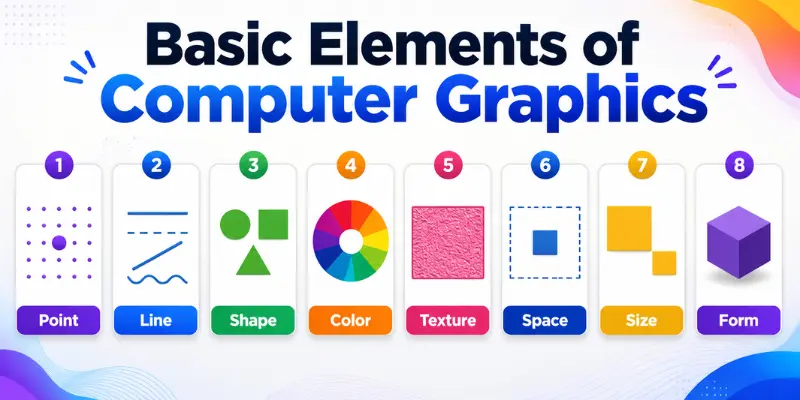
What Are the Basic Elements of Computer Graphics?
The basic elements of computer graphics are the fundamental components used to create visual designs and digital images. These elements help designers structure graphics, communicate ideas, and improve the overall appearance of digital content.
The main elements of computer graphics include:
- Point
- Line
- Shape
- Color
- Texture
- Space
- Size
- Form
When combined effectively, these elements create attractive graphics that are easy to understand and visually appealing.
8 Elements of Computer Graphics
Here are the computer graphics elements.
1. Point
A point is the most basic element of computer graphics. It represents a single position in a two-dimensional or three-dimensional space and has no length, width, or height.
Although a point appears simple, it serves as the foundation for creating more complex graphical objects. Multiple points can be connected to form lines, shapes, and digital images.
2. Line
A line is created when two or more points are connected. Lines are used to define boundaries, separate areas, create patterns, and guide the viewer’s attention.
Different types of lines, such as straight, curved, horizontal, vertical, and diagonal lines, can be used to create various visual effects in graphic designs.
3. Shape
A shape is a closed figure formed by connecting lines or curves. Shapes help define objects and organize visual content within a design.
Shapes are generally classified into two categories:
- Geometric shapes (circles, squares, triangles)
- Organic shapes (natural and irregular forms)
Shapes are widely used in logos, illustrations, icons, and user interface designs.
4. Color
Color is one of the most powerful elements of computer graphics. It helps attract attention, create emotions, and improve the visual appeal of a design.
Different color combinations can influence how users perceive information. In digital graphics, colors are commonly represented using the RGB (Red, Green, Blue) color model.
5. Texture
Texture refers to the surface appearance or visual feel of an object. It helps make graphics look more realistic and visually interesting.
In computer graphics, texture can be smooth, rough, soft, glossy, or patterned. Designers often use textures to add depth and detail to digital artwork.
6. Space
Space refers to the area around, between, and within objects in a design. Proper use of space helps improve readability and visual balance.
There are two main types of space:
- Positive space: The area occupied by objects
- Negative space: The empty area surrounding objects
Effective use of space makes designs cleaner and easier to understand.
7. Size
Size refers to the dimensions of an object in a graphic design. It helps establish visual hierarchy and indicates the importance of different elements.
Larger objects usually attract more attention, while smaller elements provide supporting information. Designers use size to create emphasis and improve communication.
8. Form
Form refers to the three-dimensional appearance of an object. While shapes are generally two-dimensional, forms have depth, height, and width.
Examples of forms include cubes, spheres, cylinders, and pyramids. In 3D computer graphics, forms help create realistic models and visual environments.
Why Are Basic Elements of Computer Graphics Important?
The basic elements of computer graphics are important because they provide the foundation for creating digital artwork, illustrations, animations, and user interfaces. Without these elements, it would be difficult to organize visual information effectively.
Some key benefits of understanding computer graphics elements include:
- Improves visual communication
- Enhances creativity and design skills
- Helps create professional-quality graphics
- Supports web and graphic design projects
- Makes digital content more engaging
- Improves the user experience
By understanding these elements, designers can create graphics that are both attractive and effective.
How These Elements Work Together
The basic elements of computer graphics do not work independently. Instead, they combine to create visually appealing and meaningful digital content.
For example, points form lines, lines create shapes, and shapes become objects within a design. Colors add visual appeal, textures provide realism, space improves layout, size creates emphasis, and form adds depth to graphical objects.
When these elements are used together effectively, designers can create graphics that are attractive, organized, and easy to understand.
Other Important Components of Computer Graphics
In addition to the basic elements, computer graphics also involve several important processes that help create interactive and realistic digital content.
1. Modeling
Modeling is the process of creating digital objects and structures. Designers use modeling techniques to build characters, objects, environments, and other graphical elements.
It serves as the foundation for creating both 2D and 3D graphics.
2. Rendering
Rendering is the process of converting a digital model into a final visual image. During rendering, the computer adds colors, lighting, shadows, and textures to create a realistic appearance.
This process helps transform raw models into finished graphics that users can view.
3. Animation
Animation involves creating the illusion of movement by displaying a sequence of images or frames.
It is widely used in movies, video games, advertisements, simulations, and educational content to make graphics more engaging and interactive.
4. Interaction
Interaction allows users to communicate with graphical systems through devices such as a mouse, keyboard, touchscreen, or controller.
Interactive graphics improve the user experience by enabling users to control actions, navigate interfaces, and interact with digital content.
Applications of Computer Graphics Elements
The basic elements of computer graphics are used in many fields to create visual content and improve communication.
Graphic Design
Designers use points, lines, shapes, colors, and textures to create logos, posters, brochures, and other marketing materials.
Web Design
Computer graphics elements help create attractive website layouts, icons, banners, and user-friendly interfaces.
Animation
Animators use graphic elements to design characters, backgrounds, and visual effects for animated content.
Video Games
Game developers use computer graphics to create realistic environments, characters, and interactive experiences.
Digital Marketing
Businesses use computer graphics to create social media posts, advertisements, infographics, and promotional content that attract users’ attention
Conclusion
So, guys, you should now have a complete understanding of the basic elements of computer graphics and their importance in digital design. These elements help designers organize information, improve creativity, and create visually appealing graphics across different platforms.
As you continue learning computer graphics, focus on understanding how these elements interact with one another. My recommendation is to start with simple design projects and gradually apply all the elements together to build professional-quality graphics and strengthen your practical skills.
Frequently Asked Questions (FAQs)
Color improves visual appeal, attracts attention, creates emotions, and helps communicate information effectively.
A shape is a two-dimensional object, while a form has three dimensions, including height, width, and depth.

- Be Respectful
- Stay Relevant
- Stay Positive
- True Feedback
- Encourage Discussion
- Avoid Spamming
- No Fake News
- Don't Copy-Paste
- No Personal Attacks
- Be Respectful
- Stay Relevant
- Stay Positive
- True Feedback
- Encourage Discussion
- Avoid Spamming
- No Fake News
- Don't Copy-Paste
- No Personal Attacks
