Computer Lab Rules
Published: 13 Jul 2026
Computers play an important role in education, helping students learn, research, and develop digital skills. A computer lab provides a shared environment where multiple users can access technology and complete academic tasks. However, to ensure that the lab remains safe, organized, and functional for everyone, certain rules must be followed.
Computer lab rules are guidelines designed to protect equipment, maintain discipline, and create a productive learning environment. These rules help prevent accidents, reduce technical problems, and ensure that all users can work efficiently without disturbing others.
In this article, you will learn about the most important computer lab rules, why they matter, and how following them can help create a safe and effective learning space for students and teachers.
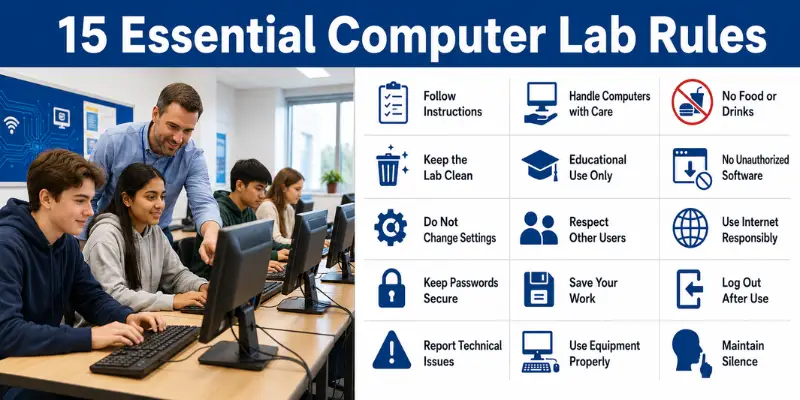
15 Essential Computer Lab Rules
Here are some important rules of computers
1. Follow Teacher or Instructor Instructions
Always listen carefully to your teacher or lab instructor and follow their instructions. They are responsible for maintaining order and ensuring that all equipment is used correctly.
Following instructions helps prevent mistakes, protects lab resources, and creates a better learning environment for everyone.
2. Handle Computers with Care
Computers and related equipment are valuable and should be handled carefully. Avoid hitting keyboards, pulling cables, or mishandling hardware components.
Proper handling reduces the risk of damage and helps extend the lifespan of lab equipment.
3. No Food or Drinks in the Lab
Food and drinks should never be brought into the computer lab. Spilled liquids and food crumbs can damage computers, keyboards, and other electronic devices.
Keeping food and drinks away from the lab helps maintain a clean and safe environment.
4. Keep the Lab Clean and Organized
Students should keep their workstations neat and tidy at all times. Dispose of waste properly and leave the area clean after completing your work.
A clean lab improves productivity and helps protect equipment from dust and damage.
5. Use Computers for Educational Purposes Only
Computer lab resources should be used only for educational and authorized activities. Avoid playing games, visiting unrelated websites, or engaging in non-academic activities during lab sessions.
Using computers responsibly ensures that valuable resources are available for learning and research.
6. Do Not Install Unauthorized Software
Students should not install software, applications, or programs without permission from the teacher or lab administrator.
Unauthorized software may contain viruses, create security risks, or affect the performance of lab computers.
7. Do Not Change System Settings
Avoid changing computer settings, desktop configurations, or network settings unless instructed to do so.
Unauthorized changes can cause technical issues and disrupt the work of other users.
8. Respect Other Users and Their Work
Always respect the privacy and work of other students. Do not access, modify, or delete someone else’s files without permission.
Respectful behavior helps create a positive and cooperative learning environment.
9. Use the Internet Responsibly
Use the internet only for educational and approved purposes. Avoid visiting inappropriate websites or downloading untrusted content.
Responsible internet usage helps maintain security and supports productive learning.
10. Keep Passwords Secure
Protect your login credentials and never share your passwords with others.
Strong and secure passwords help prevent unauthorized access to personal accounts and sensitive information.
11. Save Your Work Regularly
Students should save their work frequently while using a computer.
Regular saving helps prevent data loss caused by power failures, software errors, or unexpected system shutdowns.
12. Log Out After Use
Always log out of your account before leaving the computer.
Logging out protects personal information and prevents unauthorized access to your files and accounts.
13. Report Technical Problems Immediately
If you notice any hardware or software issues, inform the teacher or lab administrator as soon as possible.
Reporting problems early helps prevent further damage and ensures that issues are resolved quickly.
14. Use Equipment Properly
Computers, printers, scanners, headphones, and other devices should be used according to instructions.
Proper use of equipment reduces wear and tear and helps maintain the lab’s resources.
15. Maintain Silence and Discipline
Keep noise levels low and avoid disturbing others while they are working.
A quiet and disciplined environment helps students concentrate better and improves the overall learning experience.
Conclusion
So guys, you should now have a clear understanding of computer lab rules and why they are important. These rules are designed to protect equipment, ensure safety, maintain discipline, and create a productive learning environment for everyone.
From handling computers carefully and keeping the lab clean to using the internet responsibly and protecting passwords, each rule plays an important role in maintaining an effective computer laboratory. Following these guidelines not only prevents damage and technical issues but also helps students develop responsible technology habits.
My recommendation is to treat computer lab equipment with care and always follow the established rules, even when supervision is limited. Simple actions such as logging out after use, saving your work regularly, and respecting other users can make the computer lab a safer and more efficient place for learning.
Frequently Asked Questions (FAQs)
Computer lab rules are guidelines that help ensure the safe, responsible, and proper use of computers and other equipment in a computer laboratory.
They help protect equipment, maintain discipline, improve safety, and create a productive learning environment for students and teachers.
Following computer lab rules improves safety, protects equipment, reduces technical problems, and creates a better learning experience for everyone.

- Be Respectful
- Stay Relevant
- Stay Positive
- True Feedback
- Encourage Discussion
- Avoid Spamming
- No Fake News
- Don't Copy-Paste
- No Personal Attacks
- Be Respectful
- Stay Relevant
- Stay Positive
- True Feedback
- Encourage Discussion
- Avoid Spamming
- No Fake News
- Don't Copy-Paste
- No Personal Attacks
