Difference between HTTP and HTTPS
Published: 21 Jan 2026
Have you ever wondered why some websites show a padlock while others don’t? Many people get confused about HTTP and HTTPS. Understanding the difference between HTTP and HTTPS helps you know which websites are safe and which are not.
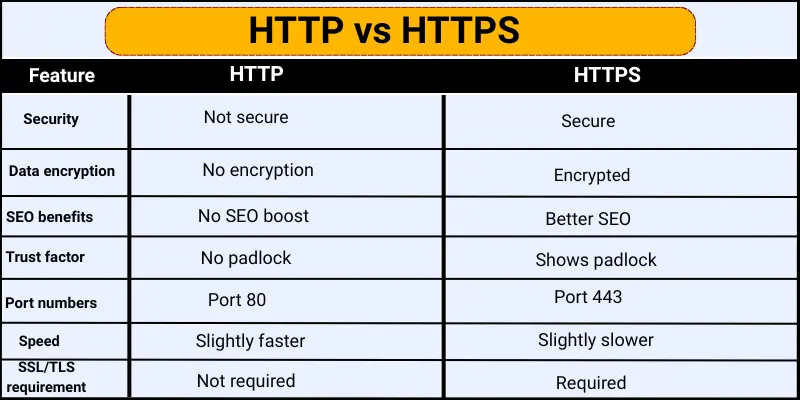
10 Difference between HTTP and HTTPS
HTTP and HTTPS are two ways that websites send data to your computer. Knowing the difference between HTTP and HTTPS helps you stay safe online and understand how websites protect your information.
- Security
- Data encryption
- SEO benefits
- Trust factor
- Port numbers
- Speed
- User privacy
- SSL/TLS requirement
- Website credibility
- Vulnerability
1. Security
Security shows how safe a website is for your data. It tells us if hackers can steal your information.
HTTP:
HTTP does not keep your data safe. When you send information on HTTP, hackers can easily see it. Websites using HTTP are more risky for passwords or personal details.
HTTPS:
HTTPS protects your data with encryption. It stops hackers from reading your information. Websites using HTTPS are much safer for online banking, shopping, and private messages.
2. Data Encryption
Data encryption means changing information into a secret code. This keeps your data safe while it travels online.
HTTP:
HTTP does not change your data into a secret code. Anyone on the network can read your information. This makes your data easy to steal or misuse.
HTTPS:
HTTPS changes your data into a secret code. Only the website can read this information. This keeps your data safe from hackers and strangers.
3. SEO Benefits
SEO helping a website rank better on search engines. A safe website can get more visitors.
HTTP:
HTTP websites do not get extra support from search engines. Google may rank them lower. This can reduce website traffic.
HTTPS:
HTTPS websites get better support from search engines. Google prefers secure websites. This helps the site rank higher and get more visitors.
4. Trust Factor
Trust factor shows how much users believe a website is safe. A trusted website makes users feel comfortable.
HTTP:
HTTP websites do not show a safety sign. Users may feel unsure about sharing their information. This can reduce trust in the website.
HTTPS:
HTTPS websites show a padlock icon in the browser. This makes users feel safe. It increases trust and confidence in the website.
5. Port Numbers
Port numbers help computers send and receive data correctly. They act like doors for internet traffic.
HTTP:
HTTP uses port number 80. This port does not add extra security. Data passes through in a simple way.
HTTPS:
HTTPS uses port number 443. This port supports secure connections. It helps protect data during transfer.
6. Speed
Speed shows how fast a website loads and sends data. Faster websites give a better user experience.
HTTP:
HTTP loads pages a little faster because it does not encrypt data. It sends information directly. This can save a small amount of time.
HTTPS:
HTTPS may take a tiny bit more time because it encrypts data. But modern technology makes this difference very small. Most users do not notice any delay.
7. User Privacy
User privacy means keeping personal information safe and private. This helps users feel protected online.
HTTP:
HTTP does not protect user privacy. Other people can see the data sent on the website. This can expose personal information.
HTTPS:
HTTPS protects user privacy with encryption. It hides personal data from strangers. This keeps users safe while browsing.
8. SSL/TLS Requirement
SSL/TLS is a security system that protects data online. It helps create a safe connection between users and websites.
HTTP:
HTTP does not use SSL or TLS. It sends data without protection. This makes the connection unsafe.
HTTPS:
HTTPS uses SSL or TLS to secure the connection. It protects data from hackers. This makes the website safe for users.
9. Website Credibility
Website credibility means how reliable and professional a website looks. A credible website gains user trust.
HTTP:
HTTP websites look less professional. Users may doubt their safety. This can reduce trust in the website.
HTTPS:
HTTPS websites look more professional. The padlock sign shows safety. This increases trust and credibility.
10. Vulnerability
Vulnerability means how easily a website can be attacked. Less vulnerability means better safety.
HTTP:
HTTP websites are easy targets for hackers. They do not protect data during transfer. This increases the risk of attacks.
HTTPS:
HTTPS websites are much harder to attack. They protect data with encryption. This reduces the risk of hacking.
Conclusion
So guys, it’s time to finish up! In this article, we have covered difference between HTTP and HTTPS in detail. I always recommend using HTTPS for your website. HTTPS is the best choice for all websites. It keeps user data safe and builds trust. It also helps websites rank better on Google. HTTP is not safe for modern websites. So, always choose HTTPS for a secure and trusted online experience.
FAQs about https vs http
HTTP stands for HyperText Transfer Protocol. It is a way websites send data to your computer. HTTP is not secure and does not protect your information.
HTTPS stands for HyperText Transfer Protocol Secure. It encrypts data to keep it safe. HTTPS is much safer than HTTP.
Look at the website address in your browser. If it starts with https:// and shows a padlock, it is secure. If it shows http:// without a padlock, it is not secure.
HTTPS protects your personal information from hackers. It also builds trust with users. HTTP does not offer these protections.
No, HTTPS cannot stop all hacking. But it makes data much harder for hackers to steal. It is still the safest option for websites.
Not really. Modern websites load fast even with HTTPS. Encryption adds only a tiny delay, which is usually not noticeable.
You need to install an SSL/TLS certificate on your website. Then update your website links to use HTTPS. Test your site to make sure it works safely.

- Be Respectful
- Stay Relevant
- Stay Positive
- True Feedback
- Encourage Discussion
- Avoid Spamming
- No Fake News
- Don't Copy-Paste
- No Personal Attacks
- Be Respectful
- Stay Relevant
- Stay Positive
- True Feedback
- Encourage Discussion
- Avoid Spamming
- No Fake News
- Don't Copy-Paste
- No Personal Attacks
