Firewall in computer network
Published: 7 Dec 2025
Did you know that a firewall on computer is the first line of defense against unwanted access? Every time you connect your device to the internet, your data becomes a target for hackers and malicious software. A firewall in a computer network keeps this data safe by blocking harmful traffic and allowing only trusted connections. To learn more about what makes a network work, check out my guide on the basic components of a computer network.
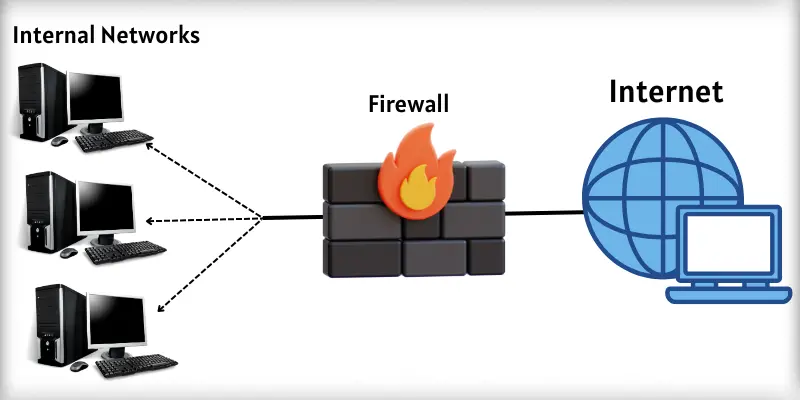
What is firewall in computer network?
A firewall in computer network is a security system that controls the flow of data between your computer and the internet. It checks every piece of information that enters or leaves the network. If the data looks safe, it passes. If the data is harmful, it blocks it.
How Does Firewall Work in Computer Network?
A firewall in a computer network works like a security guard. It checks all the data moving in and out of your system. Unsafe files or apps are blocked, while safe data is allowed. This way, the firewall keeps your computer network safe and secure.
How Firewall Works in Detail:
- Watches Network Traffic: It examines each file, message, or request.
- Blocks Dangerous Items: Stops malware, spam, and harmful programs.
- Let’s Safe Data Pass: Allows trusted files, emails, and applications.
- Manages Internet Access: Controls which apps can connect online.
- Alerts Users: Sends warnings when it blocks risky data.
Types of Firewall
Firewalls come in different types to protect computers in different ways. Each type works in its own way to keep your system safe from harmful data. Here are some types of firewalls.
- Packet Filtering Firewall: Checks data packets and blocks unsafe ones.
- Stateful Inspection Firewall: Tracks data flow and allows safe connections.
- Proxy Firewall: Hides your computer from the internet and filters content.
- Next-Generation Firewall (NGFW): Combines a traditional firewall with extra security features.
- Software Firewall: Installed on a single computer to block threats.
- Hardware Firewall: A physical device that protects multiple computers in a network.
Examples of Popular Firewalls
Many people use firewalls to protect their computers and devices. Here are some popular examples:
- Windows Defender Firewall: It comes with Windows and protects your PC.
- Norton Firewall: It protects computers from viruses and hackers.
- McAfee Firewall: It blocks harmful programs and protects data.
- Cisco ASA Firewall: It is used in offices to protect networks.
- Fortinet Firewall: It protects large networks and companies.
- ZoneAlarm Firewall: It is easy to use for home computers.
Advantages and Disadvantages of a Firewall
Firewalls protect your computer from hackers, viruses, and unwanted access. They keep your data safe and control internet traffic. But like all tools, firewalls also have some disadvantages.
| Advantages: |
|---|
|
| Disadvantages: |
|---|
|
How to Enable the Firewall on Your Computer
Enabling a firewall keeps your computer safe from viruses and hackers. It protects your files and programs while you use the internet. Turning it on is simple and takes only a few steps.
Steps to Enable Firewall:
- Go to your computer and open the Control Panel.
- Look for System and Security and click on it.
- Find Windows Defender Firewall and open it.
- Choose Turn Windows Firewall On or Off.
- Select Turn On for both private and public networks.
- Press OK to save your settings.
Common Firewall Mistakes to Avoid
Many people make mistakes that reduce firewall protection. Avoiding these mistakes keeps your computer safe.
Common Mistakes:
- Turning Off Firewall: Never turn it off for long periods.
- Wrong Configuration: Don’t change settings without knowing their effect.
- Ignoring Updates: Always update your firewall software.
- Allowing All Programs: Don’t let all apps access the internet freely.
- Not Checking Alerts: Pay attention to warnings and blocked content.
Conclusion
So friends, it’s time to finish up! In this article, we’ve covered computer firewalls in detail. I recommend that you always keep your firewall turned on to protect your files and programs. Don’t wait—check your computer settings today and enable your firewall for better safety
Common Questions about the firewall in computer
Yes, you need a firewall to keep your computer safe. It stops hackers and viruses from entering your system. Firewalls help protect your personal files and programs.
You can check your firewall settings in your computer’s Control Panel. Most firewalls show status or alerts when active. If it blocks dangerous content, it is working correctly.
A computer firewall protects only one device. A network firewall protects many devices connected together, like in an office or school. Both help keep data safe.
You should update your firewall regularly. Updates fix security problems and improve protection. Most firewalls update automatically, but check settings to be sure.
No, a firewall is important, but not enough alone. You also need antivirus software, safe browsing habits, and regular updates. Together, they keep your computer secure.
Sometimes, a firewall can slow down the internet speed. This happens when it checks many files and programs. But the safety it provides is much more critical.

hi how are you .
please mujhe guide kr di
apki site bhot zabrdst bani hai.
ap ni konsa thme use kya hai.aur bhi bhot questions hai. mi abhi start kr rha ho