Types of firewalls in network security
Published: 24 Dec 2025
Did you know that thousands of computers are attacked by hackers every single minute? This shows that computer security is very important. One of the best ways to protect your network is by using firewalls. Firewalls act like a strong wall around your computer. They stop bad people and harmful software from entering. In this article, we will learn about the types of firewalls in network security. You will also understand how each type protects computers and data.
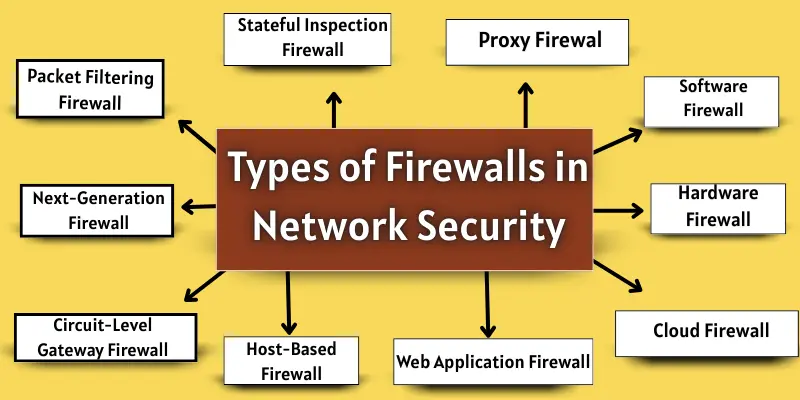
Different types of firewalls in network security
Firewalls are very important for keeping computers and networks safe. They stop hackers and viruses from entering your system. There are many different types of firewalls in network security, and each type works in a special way.
- Packet Filtering Firewall
- Stateful Inspection Firewall
- Proxy Firewall (Application-Level Gateway)
- Circuit-Level Gateway Firewall
- Next-Generation Firewall (NGFW)
- Software Firewall
- Hardware Firewall
- Cloud Firewall (Firewall as a Service – FWaaS)
- Web Application Firewall (WAF)
- Unified Threat Management (UTM) Firewall
- Network Address Translation (NAT) Firewall
- Host-Based Firewall
1. Packet Filtering Firewall
It is a simple and fast type of firewall. It looks at every data packet trying to enter or leave your network. It decides to allow or block the packet using rules like IP address, port number, and protocol. The firewall checks the packet’s header to see if it follows the rules. If it does, the packet can pass; if not, the firewall blocks it. This keeps the network safe from unauthorized access.
Advantages
Packet filtering firewalls are simple and fast. They provide basic security for networks.
| Pros |
|---|
|
Limitations
Even though they are helpful, they have some limits:
| Cons |
|---|
|
Best Use Cases
Packet filtering firewalls are best for:
- Small home or office networks
- Simple network security setups
- Situations where fast performance is needed
2. Stateful Inspection Firewall
It is smarter than a simple firewall. It looks at the whole connection, not just single packets. It tracks the state of each network connection. The firewall allows only the packets that are part of a trusted connection. If something looks suspicious, it blocks the traffic. This keeps networks safer from hackers and unwanted access.
Advantages
Stateful inspection firewalls give better security than simple firewalls.
| Pros |
|---|
|
Limitations
Even smart firewalls have some limits:
| Cons |
|---|
|
Best Use Cases
Stateful inspection firewalls are best for:
- Medium and large office networks
- Companies need stronger security
- Networks with regular internet traffic
3. Proxy Firewall (Application-Level Gateway)
This type of firewall works at the application level. It acts like a middleman between your computer and the internet. All requests go through the firewall first. It checks the data carefully before sending it to your network. If the data is safe, it passes. If not, it blocks it. This type of firewall gives extra protection by hiding your network from outsiders.
Advantages
Proxy firewalls give extra security for your network and applications.
| Pros |
|---|
|
Limitations
Even though Proxy firewalls are strong, they have some limits.
| Cons |
|---|
|
Best Use Cases
Proxy firewalls are best for networks that need extra protection.
- Protecting web servers and applications
- Small to medium business networks
- Networks with sensitive or private data
4. Circuit-Level Gateway Firewall
It works at the session layer of a network. It monitors the connections between your computer and the internet. The firewall checks each session before allowing data to pass. It does not inspect the data deeply. It only ensures that the connection is trusted. This helps protect networks from unauthorized access. At the same time, it keeps performance fast.
Advantages
Circuit-Level Gateways are simple yet effective for connection monitoring.
| Benefits |
|---|
|
Limitations
Circuit-Level Gateways have some limits.
| Drawbacks |
|---|
|
Best Use Cases
They are best for networks where fast connections matter.
- Medium office networks
- Networks with multiple users
- Situations needing quick session checks
5. Next-Generation Firewall (NGFW)
It is a modern type of firewall. It provides more than basic protection. NGFW looks at data packets deeply. It can detect harmful content and block attacks. It also checks the applications running on your network. NGFW combines traditional firewall features with extra security tools. This helps keep networks safe from advanced threats.
Advantages
Next-Generation Firewalls offer strong and modern protection.
| Pros |
|---|
|
Limitations
Even NGFW has some limits.
| Cons |
|---|
|
Best Use Cases
NGFW is best for modern networks with high security needs.
- Large office or enterprise networks
- Companies with sensitive data
- Networks that need application-level monitoring
6. Software Firewall
It is a program that you install on your computer. It watches all the data coming in and going out. It blocks bad traffic and lets safe data pass. You can control it easily from your computer. It works well for personal computers and small networks. Software firewalls protect your system from hackers and viruses.
Advantages
Software firewalls give good protection for personal use.
| Benefits |
|---|
|
Limitations
Software firewalls have some limits.
| Drawbacks |
|---|
|
Best Use Cases
Software firewalls are best for personal or small networks.
- Home computers
- Small offices
- Laptops and desktops
7. Hardware Firewall
It is a physical device. You connect it between your network and the internet. It watches all incoming and outgoing data. It blocks bad traffic and lets safe data pass. It works for all computers in the network. Hardware firewalls give strong protection for bigger networks.
Advantages
Hardware firewalls provide strong, fast network security.
| Pros |
|---|
|
Limitations
Hardware firewalls also have some limits.
| Cons |
|---|
|
Best Use Cases
Hardware firewalls are best for bigger networks.
- Offices with many computers
- Medium and large business networks
- Situations needing strong security
8. Cloud Firewall (Firewall as a Service – FWaaS)
This type of firewall works in the cloud, not on your computer. It protects your network from the internet. All data goes through the cloud firewall first. It blocks unsafe traffic and lets safe traffic pass. You can manage it from anywhere. Cloud firewalls are suitable for remote teams and online services.
Advantages
Cloud firewalls provide easy, flexible protection.
| Benefits |
|---|
|
Limitations
Cloud firewalls have some limits.
| Drawbacks |
|---|
|
Best Use Cases
Cloud firewalls are best for online networks.
- Remote teams and employees
- Companies using cloud services
- Networks with many locations
9. Web Application Firewall (WAF)
It protects websites and web apps. It watches all data coming to your website. It blocks harmful requests and allows safe requests. WAF stops attacks like hackers trying to steal information. It works well for online services and e-commerce sites.
Advantages
WAF gives strong protection for websites.
| Pros |
|---|
|
Limitations
WAF also has some limits.
| Cons |
|---|
|
Best Use Cases
WAF is best for online applications.
- E-commerce websites
- Web services handling sensitive data
- Websites open to public traffic
10. Unified Threat Management (UTM) Firewall
It combines multiple security tools into a single device. It can act as a firewall, antivirus, and spam filter. It watches all network data. It blocks harmful traffic and lets safe traffic pass. UTM firewalls make network security easier and stronger.
Advantages
UTM firewalls provide complete protection in a single device.
| Pros |
|---|
|
Limitations
Even UTM firewalls have some limits.
| Cons |
|---|
|
Best Use Cases
UTM firewalls are best for networks needing all-in-one security.
- Small to medium business networks
- Offices with limited IT staff
- Networks needing combined protection
11. Network Address Translation (NAT) Firewall
A NAT Firewall hides the real IP addresses of devices in a network. It replaces private IP addresses with a single public IP address. It blocks direct access from the internet to your devices. Only safe traffic is allowed in. NAT firewalls help keep networks safe from hackers.
Advantages
NAT firewalls hide devices and protect the network.
| Pros |
|---|
|
Limitations
NAT firewalls have some limits.
| Cons |
|---|
|
Best Use Cases
NAT firewalls are best for hiding network devices.
- Home networks
- Small offices
- Networks with multiple devices
12. Host-Based Firewall
This type of firewall is installed on a single computer or device. It protects the computer from bad traffic. It checks all incoming and outgoing data. It blocks harmful requests and allows safe ones. Host-based firewalls give personal protection for individual devices.
Advantages
Host-based firewalls protect each device separately.
| Pros |
|---|
|
Limitations
Host-based firewalls have some limits.
| Cons |
|---|
|
Best Use Cases
Host-based firewalls are best for personal devices.
- Laptops and desktops
- Remote workers’ computers
- Small offices with few devices
How to Choose the Right Firewall for Network Security
Choosing the proper firewall is important for safety. A good firewall protects your data and devices. Follow these simple points to make the right choice.
- Know Your Network Size: Small networks need basic firewalls, while large networks need advanced protection.
- Understand Your Security Needs: Choose a firewall based on what you want to protect, like devices, data, or websites.
- Choose Easy Management: Pick a firewall that is simple to control and does not need expert skills.
- Check Your Budget: Free or low-cost firewalls are suitable for home users, while businesses can invest more.
- Think About Future Growth: Select a firewall that can handle more users and devices in the future.
- Combine Firewalls if Needed: Using more than one firewall can give stronger network security.
Conclusion
So, friends, now let’s finish up! In this post, we covered the types of firewalls in network security. We learned how different firewalls protect computers and networks. Some firewalls are simple. Some are advanced. Each firewall has its own job. My personal recommendation is to choose a firewall based on your network size and needs. For home users, a software or cloud firewall is a good choice. For businesses, NGFW or UTM works better.
So, start using a firewall today and protect your data before it is too late.
FAQs about types of firewalls
It depends on the type of firewall. Hardware or NGFW firewalls can protect all devices in a network. Small offices may also use software firewalls for extra safety.
Some firewalls can slow down traffic a little. Simple ones like packet filtering are fast. Advanced firewalls, such as NGFWs, may require more processing power.
Yes, using more than one type can give extra protection. For example, software plus hardware firewalls. This is helpful for bigger networks or sensitive data.
Yes, cloud firewalls are safe and flexible. They can protect remote teams and multiple locations. Small businesses can avoid buying expensive hardware.
Software or NAT firewalls are usually enough for home users. They are easy to use and affordable. Cloud firewalls are also good if you want remote control.

- Be Respectful
- Stay Relevant
- Stay Positive
- True Feedback
- Encourage Discussion
- Avoid Spamming
- No Fake News
- Don't Copy-Paste
- No Personal Attacks
- Be Respectful
- Stay Relevant
- Stay Positive
- True Feedback
- Encourage Discussion
- Avoid Spamming
- No Fake News
- Don't Copy-Paste
- No Personal Attacks
