Units of Computer Memory
Published: 27 Jun 2026
Have you ever wondered what 1 GB, 1 TB, or 512 MB really means? Every file, photo, video, and application on your computer occupies a certain amount of storage space. To measure this digital information, computers use special units known as computer memory units.
Whether you are checking the storage capacity of a smartphone, buying a hard drive, or comparing cloud storage plans, units of computer memory help you understand how much information a device can hold. Learning these units is essential for students, computer users, and anyone interested in technology.
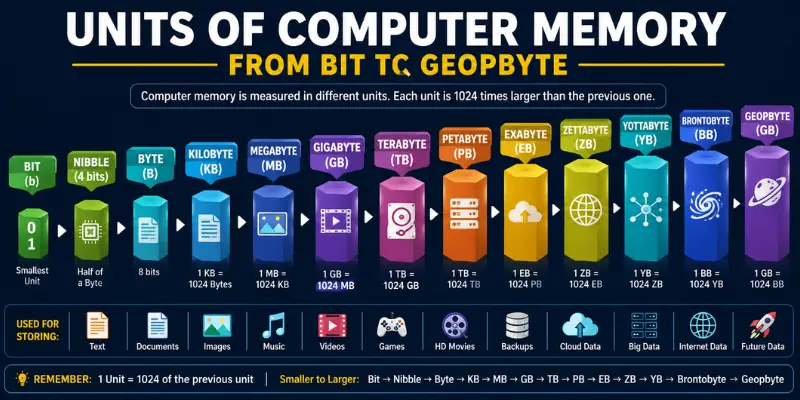
What Are Computer Memory Units?
Computer memory units are measurements that represent the amount of data stored in a computer system. Just as meters measure distance and kilograms measure weight, memory units measure digital information.
These units allow computers to store, organize, process, and transfer data efficiently. Every file stored on a computer has a size measured in memory units.
For example:
- A small text document may use a few kilobytes (KB).
- A high-quality image may require several megabytes (MB).
- A movie may occupy multiple gigabytes (GB).
- Large servers and data centers often store data in terabytes (TB) or petabytes (PB).
Without memory units, it would be impossible to measure storage capacity accurately.
Why Do Computers Use Memory Units?
Computers use memory units for several important reasons:
- To measure the size of files and folders
- To determine storage capacity
- To compare memory devices
- To manage digital information efficiently
- To monitor data usage and storage requirements
These measurements make it easier for users and computers to handle data accurately.
Units of Computer Memory in Order (Smallest to Largest)
The following list shows computer memory units from the smallest to the largest:
- Bit (b)
- Nibble
- Byte (B)
- Word
- Kilobyte (KB)
- Megabyte (MB)
- Gigabyte (GB)
- Terabyte (TB)
- Petabyte (PB)
- Exabyte (EB)
- Zettabyte (ZB)
- Yottabyte (YB)
- Brontobyte
- Geopbyte
As we move from one unit to the next, the storage capacity increases significantly
1. Bit (b)
A bit, short for Binary Digit, is the smallest unit of data in a computer. A single bit can hold only one value, either 0 or 1. Although a bit stores very little information, millions and billions of bits work together to represent text, images, videos, and software.
Measurement / Size
- 1 Bit = One Binary Digit (0 or 1)
Key Features of a Bit
- Smallest memory unit
- Represents 0 or 1
- The foundation of all digital data
- Used in binary calculations
Example of a Bit
When a computer stores the letter “A,” it does not save the actual letter. Instead, it stores a series of bits that represent that character.
2. Nibble
Although nibble is not commonly used in everyday computing, it plays an important role in digital electronics and low-level programming.
Measurement / Size
- 1 Nibble = 4 Bits
Key Features of a Nibble
- Contains 4 bits
- Half of a byte
- Used in hexadecimal representation
- Important in computer architecture
Example of a Nibble
A nibble can represent values from 0 to 15.
3. Byte (B)
A byte is a group of 8 bits and is one of the most commonly used memory units.
Most modern computers use bytes to measure storage and memory capacity. A single character, such as a letter or number, usually requires one byte of storage.
Key Features of a Byte
- Contains 8 bits
- Basic unit of data storage
- Used to store characters and symbols
- Forms larger memory units
Examples of a Byte
- Letter A = 1 Byte
- Number 5 = 1 Byte
- Symbol @ = 1 Byte
4. Word
A word is a group of bits that a computer processor can handle at one time. The size of a word depends on the computer’s architecture.
Common Word Sizes
- 16-bit
- 32-bit
- 64-bit
Modern computers typically use 64-bit processors, allowing them to process larger amounts of data more efficiently.
Why Is a Word Important?
- Improves processing speed
- Helps the CPU handle instructions
- Supports advanced computing tasks
5. Kilobyte (KB)
A kilobyte contains 1,024 bytes. Although a kilobyte is considered small by today’s standards, it was once a significant amount of storage.
1 KB Equals
- 1,024 Bytes
- 8,192 Bits
Real-Life Examples of KB
- Small text files
- Simple configuration files
- Short emails without attachments
6. Megabyte (MB)
A megabyte contains 1,024 kilobytes. Megabytes are commonly used to measure images, documents, songs, and small applications.
1 MB Equals
- 1,024 KB
- 1,048,576 Bytes
Real-Life Examples of MB
- High-quality photographs
- PDF documents
- MP3 audio files
- Mobile applications
7. Gigabyte (GB)
A gigabyte contains 1,024 megabytes. Gigabytes are one of the most commonly used storage measurements today.
1 GB Equals
- 1,024 MB
- 1,073,741,824 Bytes
Real-Life Examples of GB
- Smartphone storage
- Laptop RAM
- Video games
- Movies and video files
Common GB Storage Sizes
- 64 GB smartphones
- 128 GB smartphones
- 256 GB SSDs
- 16 GB RAM modules
8. Terabyte (TB)
A terabyte contains 1,024 gigabytes. Terabytes are commonly used for hard drives, SSDs, servers, and cloud storage systems.
1 TB Equals
- 1,024 GB
- 1,048,576 MB
Real-Life Examples of TB
- External hard drives
- Large SSDs
- Business data storage
- Backup systems
Common TB Storage Sizes
- 1 TB HDD
- 2 TB HDD
- 4 TB SSD
- 8 TB External Drive
9. Petabyte (PB)
A petabyte contains 1,024 terabytes (TB).
Petabytes are commonly used by large organizations, cloud storage providers, and data centers that manage massive amounts of information.
1 PB Equals
- 1,024 TB
- 1,048,576 GB
Real-Life Examples of PB
- Enterprise databases
- Large cloud storage systems
- Scientific research data
- Video streaming platforms
10. Exabyte (EB)
An exabyte contains 1,024 petabytes (PB). Exabytes are used to measure extremely large data collections generated by global networks and internet services.
1 EB Equals
- 1,024 PB
- More than 1 billion GB
Real-Life Examples of EB
- Global internet traffic
- Large-scale data archives
- International cloud infrastructures
11. Zettabyte (ZB)
A zettabyte contains 1,024 exabytes (EB). Zettabytes are used to describe worldwide digital data and large-scale cloud computing environments.
1 ZB Equals
- 1,024 EB
- More than 1 trillion GB
Real-Life Examples of ZB
- Global data creation
- Worldwide cloud storage
- Internet-scale computing systems
12. Yottabyte (YB)
A yottabyte contains 1,024 zettabytes (ZB). This unit represents an enormous amount of storage that is difficult to imagine in everyday computing.
1 YB equals
- 1,024 ZB
- More than 1 quadrillion GB
Real-Life Examples of YB
- Future global data storage
- Massive artificial intelligence systems
- Large scientific simulations
13. Brontobyte
A brontobyte is a theoretical unit of memory larger than a yottabyte.
1 Brontobyte Equals = 1,024 Yottabytes
Brontobytes are rarely used in practical computing but are sometimes mentioned in discussions of future storage technologies.
14. Geopbyte
A geopbyte is considered one of the largest theoretical computer memory units.
1 Geopbyte Equals = 1,024 Brontobytes
Geopbytes are mainly used for educational purposes when explaining extremely large storage measurements.
Computer Memory Units Chart: Size and Storage Capacity
The table below shows common computer memory units, their sizes, and the amount of data they can typically store.
| Memory Unit | Size | Approximate Storage Capacity |
|---|---|---|
| Bit (b) | 1 Binary Digit | Stores either 0 or 1 |
| Nibble | 4 Bits | Stores one hexadecimal value (0–15 |
| Byte (B) | 8 Bits | Stores one character, such as a letter or number |
| Word | 16, 32, or 64 Bits | Stores data processed by the CPU at one time |
| Kilobyte (KB) | 1,024 Bytes | About one page of text or a small document |
| Megabyte (MB) | 1,024 KB | Hundreds of pages of text, several photos, or one MP3 song |
| Gigabyte (GB) | 1,024 MB | Thousands of photos, several HD videos, or many applications |
| Terabyte (TB) | 1,024 GB | Hundreds of thousands of photos, thousands of videos, and large backups |
| Petabyte (PB) | 1,024 TB | Millions of photos, large databases, and enterprise storage systems |
| Exabyte (EB) | 1,024 PB | Billions of documents and massive cloud storage systems |
| Zettabyte (ZB) | 1,024 EB | Global internet and cloud data storage measurements |
| Yottabyte (YB) | 1,024 ZB | Extremely large-scale worldwide data storag |
| Brontobyte | 1,024 YB | Theoretical storage beyond current technology |
| Geopbyte | 1,024 Brontobytes | Massive theoretical storage capacity far beyond today’s needs |
Memory Conversion Formula
You can convert memory units using the following formulas:
- KB = Bytes ÷ 1,024
- MB = KB ÷ 1,024
- GB = MB ÷ 1,024
- TB = GB ÷ 1,024
Similarly:
- Bytes = KB × 1,024
- KB = MB × 1,024
- MB = GB × 1,024
- GB = TB × 1,024
Easy Memory Conversion Examples
Example 1
How many kilobytes are in 2,048 bytes?
Answer:
2,048 ÷ 1,024 = 2 KB
Example 2
How many megabytes are in 2 GB?
Answer:
2 × 1,024 = 2,048 MB
Example 3
How many gigabytes are in 3 TB?
Answer:
3 × 1,024 = 3,072 GB
Example 4
How many megabytes are in 5 GB?
Answer:
5 × 1,024 = 5,120 MB
These conversions help users understand storage capacities and compare different devices more accurately.
Real-Life Examples of Computer Memory Units
Computer memory units are used every day, even if many people do not notice them.
Smartphone Storage
Modern smartphones often come with:
- 64 GB storage
- 128 GB storage
- 256 GB storage
- 512 GB storage
These memory units determine how many apps, photos, and videos a phone can store.
Laptop and Desktop Computers
Computers are commonly used:
- 8 GB RAM
- 16 GB RAM
- 32 GB RAM
Storage options may include:
- 256 GB SSD
- 512 GB SSD
- 1 TB SSD
USB Flash Drives
USB drives are available in different capacities, such as:
- 16 GB
- 32 GB
- 64 GB
- 128 GB
- 256 GB
Cloud Storage Services
Cloud platforms use memory units to define storage plans.
For example:
- 15 GB free storage
- 100 GB storage plans
- 1 TB premium plans
Common Memory Sizes Used Today
Technology has advanced significantly, resulting in larger memory capacities.
Popular RAM Sizes
The most common RAM sizes include:
- 4 GB RAM
- 8 GB RAM
- 16 GB RAM
- 32 GB RAM
- 64 GB RAM
Popular SSD Sizes
Modern SSDs are commonly available in:
- 256 GB
- 512 GB
- 1 TB
- 2 TB
- 4 TB
Popular Hard Disk Sizes
Traditional hard drives often provide:
- 500 GB
- 1 TB
- 2 TB
- 4 TB
- 8 TB
Why Understanding Computer Memory Units Is Important?
Learning computer memory units offers several benefits.
Better Storage Management
Users can monitor available storage and avoid running out of space.
Easier Device Comparison
Memory units help compare smartphones, laptops, SSDs, and hard drives.
Smarter Buying Decisions
Understanding storage measurements makes it easier to choose the right device.
Improved Knowledge of Technology
Computer memory units are a fundamental concept in computer science and digital technology.
Common Mistakes About Computer Memory Units
Confusing MB with GB
Many users assume MB and GB are the same, but 1 GB equals 1,024 MB.
Confusing Memory with Storage
RAM is temporary memory, while SSDs and hard drives provide long-term storage.
Ignoring Unit Differences
A device with 512 GB storage can hold significantly more data than a device with 128 GB storage.
Future of Computer Memory Units
As technology continues to evolve, storage requirements are increasing rapidly.
Artificial intelligence, cloud computing, video streaming, and big data systems generate enormous amounts of information every day. Because of this growth, larger memory units such as petabytes, exabytes, and zettabytes are becoming increasingly important.
In the future, advanced storage technologies may make yottabytes and even larger units more common in large-scale computing environments.
Conclusion
So, guys, you now understand computer memory units and their importance in modern computing. Computer memory units measure the amount of data a computer can store and process. They start from the smallest unit, called a bit, and extend to larger units such as bytes, kilobytes, megabytes, gigabytes, terabytes, petabytes, and beyond.
By understanding these memory units, you can compare storage devices, manage files more efficiently, and make smarter decisions when purchasing computers, smartphones, SSDs, or cloud storage plans.
FAQs about units of memory in computers
Computer memory units are measurements used to determine the size and storage capacity of digital data. Common examples include bits, bytes, kilobytes, megabytes, gigabytes, and terabytes.
The smallest unit of computer memory is a bit. A bit can store only one binary value, either 0 or 1.
One byte contains 8 bits. A byte is commonly used to store a single character or symbol.
One kilobyte (KB) contains 1,024 bytes.
Among the commonly discussed memory units, geopbyte is considered one of the largest theoretical units of digital storage.
Computer memory units are used in smartphones, laptops, SSDs, hard drives, USB flash drives, cloud storage services, and data centers worldwide.

- Be Respectful
- Stay Relevant
- Stay Positive
- True Feedback
- Encourage Discussion
- Avoid Spamming
- No Fake News
- Don't Copy-Paste
- No Personal Attacks
- Be Respectful
- Stay Relevant
- Stay Positive
- True Feedback
- Encourage Discussion
- Avoid Spamming
- No Fake News
- Don't Copy-Paste
- No Personal Attacks
