What is power supply in computer
Published: 8 Mar 2026
Every computer needs electricity to work, but the electricity from a wall socket cannot be used directly. This is where the power supply in computer becomes very important. It converts the electrical power from the outlet into the correct form that computer parts can safely use. Without a power supply, the motherboard, CPU, and other components would not receive the power they need to function properly.
What is the Definition of power supply in computer?
A power supply in a computer is a hardware component that provides electricity to all parts of the computer. It takes electrical power from the wall outlet and converts it into a form that the computer can use. Most computers use a device called a Power Supply Unit (PSU) for this purpose. The power supply changes alternating current (AC) into direct current (DC). It then sends the correct amount of power to components like the motherboard, CPU, and storage devices.
Why a Power Supply Is Important in a Computer
The power supply in a computer is a critical component because it powers every part of the system. Without a power supply, the computer cannot start or perform any task.
Importance of Power Supply:
- It powers all computer components.
- It converts AC electricity into usable DC power.
- It maintains a stable voltage for safe operation.
- It protects hardware from electrical damage.
- It helps the computer run smoothly and efficiently.
How a Power Supply Works
The power supply in a computer converts electricity from a wall socket into a form that the computer can use. It ensures that all parts receive the correct voltage and current to operate properly.
How It Works Step by Step:
- Electricity enters the PSU from the wall outlet (AC power).
- The PSU converts AC power into DC power.
- Voltage is regulated to prevent component damage.
- Power is distributed to the motherboard, CPU, hard drives, and other devices.
- A cooling fan helps keep the power supply from overheating.
Main Components of a Power Supply
A computer power supply consists of several key components that work together to deliver stable power. Each component has a specific role to ensure the computer runs safely and efficiently. Here is a Parts of a Power Supply
- Transformer
- Rectifier
- Filter
- Regulator
- Protection Circuitry
- Heatsinks/Fan
1. Transformer
A transformer reduces the high voltage that comes from the wall outlet. Computers do not need very high voltage to work. This part reduces the voltage to a safer level. It prepares the electricity for the next steps inside the power supply.
2. Rectifier
A rectifier changes AC power into DC power. Computers cannot run on AC electricity. This component uses diodes to convert AC into pulsating DC. After this step, the power becomes suitable for computer components.
3. Filter
A filter smooths the DC power. The electricity from the rectifier is not completely stable. Filters use capacitors and inductors to remove ripples and noise. This helps provide clean and steady power to the system.
4. Regulator
A regulator keeps the voltage stable. Sometimes the input power can change or fluctuate. The regulator maintains a constant output voltage. This protects computer components from damage.
5. Protection Circuitry
Protection circuitry keeps the computer safe from electrical problems. It monitors the power supply continuously. It protects the system from power surges, over-voltage, and short circuits. This helps prevent hardware damage.
6. Heatsinks / Fan
Heatsinks and fans control the temperature of the power supply. Power conversion creates heat inside the PSU. The heatsink absorbs heat, and the fan removes it. This prevents overheating and keeps the power supply working properly.
Types of Power Supply in a Computer
Computer power supplies come in different types. Each type is designed for different computer systems and user needs.
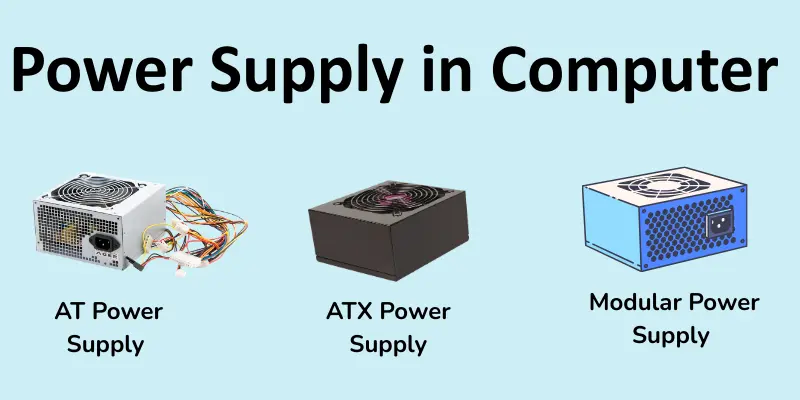
1. AT Power Supply
The AT power supply is an older type used in early computers. It was common in the past but is rarely used today. This power supply had a simple design and a manual power switch. Modern computers no longer use AT power supplies.
2. ATX Power Supply
The ATX power supply is the most common type used in modern computers. It provides stable and efficient power to computer components. This power supply also supports automatic power control. Most desktop computers today use ATX power supplies.
3. Modular Power Supply
A modular power supply allows users to connect only the cables they need. It helps reduce the number of cables inside the computer case. It also improves airflow and keeps the system cleaner. Many high-end computers use modular power supplies.
4. Non-Modular Power Supply
A non-modular power supply has all cables permanently attached. Users cannot remove or change the cables. This type is usually cheaper and commonly used in basic computers. However, extra cables can create clutter inside the case.
5. Semi-Modular Power Supply
A semi-modular power supply combines modular and non-modular designs. Some cables are permanently attached, while others can be removed. This provides greater flexibility than non-modular power supplies. Many users prefer this type for better cable management.
Functions of Power Supply
The power supply in a computer performs important jobs to keep your system running safely. It ensures all components get the correct and stable electricity they need.
- Converts AC to DC: Changes electricity from AC to DC so computer parts can use it.
- Supplies Power to Components: Provides electricity to the motherboard, CPU, drives, and other devices.
- Maintains Stable Voltage: Keeps the voltage steady to prevent damage to hardware.
- Protects the System: Protects the computer from power surges and electrical problems.
- Distributes Power: Sends the correct amount of power to different computer components.
Signs of a Failing Power Supply
A failing power supply in a computer can cause different problems in the system. These signs can help you identify if the power supply is not working properly.
- Computer Does Not Turn On: The computer may not start when you press the power button. This can happen if the power supply is damaged or if it is not providing electricity.
- Random Shutdowns: The computer may suddenly turn off while you are using it. This happens when the power supply cannot provide stable power.
- Frequent Restarts: The computer may restart again and again without warning. This can be a sign of a failing power supply.
- Burning Smell: A burning smell from the computer case may indicate a damaged power supply. This can happen when internal parts overheat.
- Unusual Fan Noise: The power supply fan may become very loud or stop working. This can lead to overheating and system problems.
Advantages and Disadvantages of Poor Power Supply
A power supply plays an important role in a computer’s performance and safety. A poor or low-quality power supply can affect how the computer works. It may also cause different hardware problems.
| Advantages |
|---|
|
| Disadvantages |
|---|
|
Conclusion
So guys, it’s time to finish up! In this article, we’ve covered the power supply in computer in detail. We learned what a power supply is, how it works, and why it is important for a computer system. In my opinion, choosing a high-quality power supply is always a smart decision because it protects your computer and keeps it running smoothly. If you want your computer to last longer and perform better, make sure you select the right PSU and maintain it properly.
FAQs about the power supply in computer
A power supply is a device that provides electrical power to an electronic system. It converts electricity from a source into a usable form. This power is then delivered to different components so they can operate properly.
AC (alternating current) comes from the wall socket, but computers cannot use it directly. DC (direct current) is the type of electricity the computer needs. The power supply converts AC into DC for safe use.
Signs include the computer not turning on, random shutdowns, frequent restarts, burning smells, or loud fan noise. These indicate the PSU is not providing stable power. Replacing it immediately is important to protect your computer.
A good-quality power supply can last 5 to 10 years. Its lifespan depends on usage, heat, and quality. Regular cleaning and proper ventilation can extend its life.
Yes, if you follow safety precautions, you can install a power supply yourself. Make sure the computer is unplugged before starting. Connect all cables carefully to the motherboard, CPU, and other components.

- Be Respectful
- Stay Relevant
- Stay Positive
- True Feedback
- Encourage Discussion
- Avoid Spamming
- No Fake News
- Don't Copy-Paste
- No Personal Attacks
- Be Respectful
- Stay Relevant
- Stay Positive
- True Feedback
- Encourage Discussion
- Avoid Spamming
- No Fake News
- Don't Copy-Paste
- No Personal Attacks
